Edwin Langley - Software Developer
Characters and Strings
Characters and Strings
Characters
The Character type is represented using two bytes and uses the Unicode standard (https://home.unicode.org/). A char can only be 1 character. Single quotes are used to specify a char. For example
char newChar = 'b';Escape Sequences
Escape sequences are characters that have a special meaning and will be interpreted differently than ‘standard’ characters. They take the form of a slash followed by a character.
Quote Escape Sequence
Single quotes and double quotes are the characters used to define the bounds of a character and string respectively. You might genuinely want to use one of these characters within the string. To do this you can put a backwards slash ahead of this character and it will no longer be recognised as the end of a char or string. For example
char newChar = '\'';
Console.WriteLine(newChar);
Backslash Escape Sequence
The same logic can be applied to the backslash character itself, you might want to use the character instead of it being interpreted as the escape character. To do this just put another backwards slash in front of it.
char newChar = '\\';
Console.WriteLine(newChar);
Null Escape Sequence
To represent the null character, you would do the following:
char newChar = '\0';
Console.WriteLine(newChar);
Alert Escape Sequence
The alert or bell character is:
char newChar = '\a';
Console.WriteLine(newChar);
Backspace Escape Sequence
The backspace character is:
char newChar = '\b';
Console.WriteLine(newChar);
Form Feed Escape Sequence
The Form feed character is:
char newChar = '\f';
Console.WriteLine(newChar);
New Line Escape Sequence
The new line character is (this one is pretty common):
char newChar = '\n';
Console.WriteLine(newChar);
Carriage Return Escape Sequence
The Carriage Return character is:
char newChar = '\r';
Console.WriteLine(newChar);
Horizontal Tab Escape Sequence
The Horizontal Tab character is:
char newChar = '\t';
Console.WriteLine(newChar);
Vertical Tab Escape Sequence
The Vertical Tab character is:
char newChar = '\v';
Console.WriteLine(newChar);
Char to Numeric Conversion
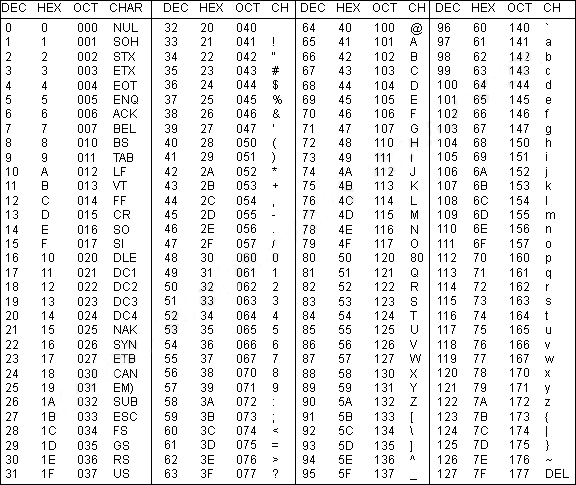
As chars in C# can also be represented by their ASCII values, it is possible to convert a char into a numeric type of at least unsigned short.
If the type is smaller than an unsigned short then an explicit conversion will need to occur.
The String Type
A string is an immutable array of characters, unlike a char, strings are specified within double-quotes. For example:
string newString = "This is a new string!";
Console.WriteLine(newString);
Although string is a reference type, the standard equality operator will function like that of a value type. This means that ” == ” can be used to compare the value stored by the reference type.
The list of escape sequences we explored earlier also work within strings.
Verbatim String Literals
A verbatim string literal is a string that does not recognise escape sequences and therefore the backslash character can be used without issue. This is very useful when you come to specify file locations.
To use a verbatim string literal you place a ” @ ” character before the opening double quote of your string. For example
string verbatimString = @"\This \is \a \verbatim \string \literal. All of the backwards slashes are intact.";
Console.WriteLine(verbatimString);
Concatenating Strings
The word concatenate means to link two or more things together. This is no different in the case of string concatenation – the process of linking strings together.
The ‘+’ operator can be used in conjunction with a number of strings to add them together. For example:
string a = "Hello";
string b = ", ";
string c = "World!";
Console.WriteLine(a + b + c); //Outputs "Hello, World!"
However, using this operator to build large strings is ineffective and should be avoided.
String Interpolation
Another approach to linking strings is interpolation.
Any string that is preceded with a dollar sign $ is referred to as an interpolated string – these strings can utilise other values within curly braces { }.
string toBeIncluded = "once";
string inclusion = $"This sentence will display {toBeIncluded}";
Console.WriteLine(inclusion);
int x = 1;
string y = $"This sentence will display {x} time";
Console.WriteLine(y);
As you can see above, any type can be used in string interpolation. Behind the scenes, C# calls ToString() on these values to convert them to a string.
Unless the string is also a verbatim string, the interpolated string must only span one line otherwise it will not work.